

 IV
IV
Postbacks
Record conversions from your affiliate network with a postback URL.
This page shows you how to get conversions into Proferex with a postback: a call your offer source makes to your postback URL whenever one of your visitors converts.
It works in two steps. When Proferex sends a visitor to an offer, it adds the visitor's click ID to the Offer URL. When that visitor converts, your offer source calls your postback URL with the same click ID, and Proferex records the conversion against the right campaign, lander, and offer.
Copy your postback URL
Go to Tracker → Tracker Settings and find the Global Postback URL card on the General Settings tab. Pick a domain in Select Tracking Domain and copy the Postback URL.
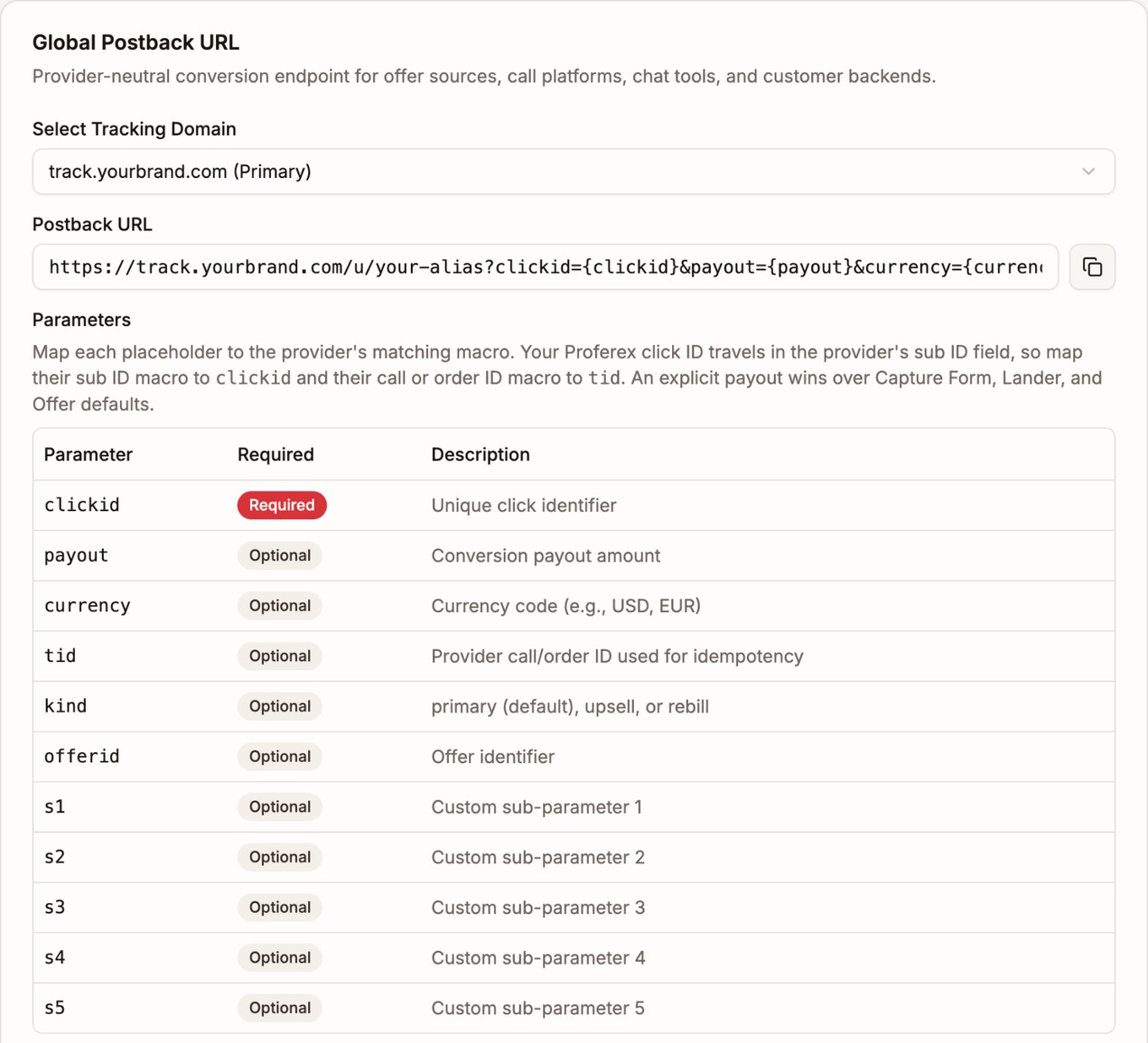
You have one postback URL for your whole account. It works for every offer and every offer source, so you set it up once per offer source. It looks like this:
https://track.mydomain.com/u/YOUR-ALIAS?clickid={clickid}&payout={payout}¤cy={currency}&tid={tid}&kind={kind}&offerid={offerid}&s1={s1}&s2={s2}&s3={s3}&s4={s4}&s5={s5}Send the click ID to your offer source
Your offer source can only send the click ID back if it receives it first. Put {clickid} in your Offer URL, in the parameter your offer source uses for sub IDs:
https://trk.rewardhubs.com/c?offer_id=4821&aff_id=10937&aff_sub={clickid}Proferex replaces {clickid} with the visitor's click ID when it sends them to the offer. See Offer URL.
Add the postback URL to your offer source
In your offer source's postback settings, paste your postback URL. Then replace each value in curly braces with your offer source's matching macro. For an offer source that sends the sub ID back as {aff_sub}, the payout as {payout}, and its transaction ID as {transaction_id}, the postback URL becomes:
https://track.mydomain.com/u/YOUR-ALIAS?clickid={aff_sub}&payout={payout}&tid={transaction_id}| Parameter | What it carries |
|---|---|
clickid | The click ID your offer source received in the Offer URL. Required. |
payout | What you earn for the conversion. |
currency | The payout's currency, such as USD or EUR. |
tid | Your offer source's transaction ID. It stops one conversion being recorded twice. |
kind | primary for a normal conversion, the default, or upsell or rebill. See Upsells and rebills. |
offerid | The ID of one of your offers, if the conversion belongs to another offer than the one the visitor was sent to. |
s1 to s5 | Any other values you want to keep with the conversion. |
Only clickid is required. You can delete parameters your offer source cannot fill. A value your offer source leaves as {something} is ignored, so leaving one in does no harm.
Your offer source calls the postback URL as a normal web request (GET). Ask your affiliate manager if you cannot find the setting.
Payout and currency
Send your offer source's payout macro in payout whenever it has one. The amount that arrives is the amount Proferex records. If payout is missing, Proferex uses the Payout set on the offer. See Payout and currency.
The currency comes from currency, then from the offer's currency, then USD. When Proferex uses the offer's payout, it also uses the offer's currency. Revenue in another currency is converted to your display currency for your reports. See Currency.
Upsells and rebills
A click can have more than one conversion, such as a sale and a later upsell. Send each extra one with kind=upsell or kind=rebill. Its revenue is added to your reports, but the Conversions column only counts the first, primary conversion.
Proferex records each conversion only once:
- With
tid, a second postback with the same click ID and the sametidis ignored. - Without
tid, only one conversion of each kind is recorded per click.
Test a postback
- Open your campaign link yourself and click through to the offer, so a real click is recorded.
- Go to Tracker → Tracker Settings, open Click/Conversion Log, and choose Clicks. Copy the Click ID of your test click.
- Paste your postback URL into your browser with that click ID and a test payout, and open it:
https://track.mydomain.com/u/YOUR-ALIAS?clickid=YOUR-TEST-CLICK-ID&payout=0A working postback shows {"success":true}. Switch the log to Conversions to see it straight away. It reaches your reports within a minute.
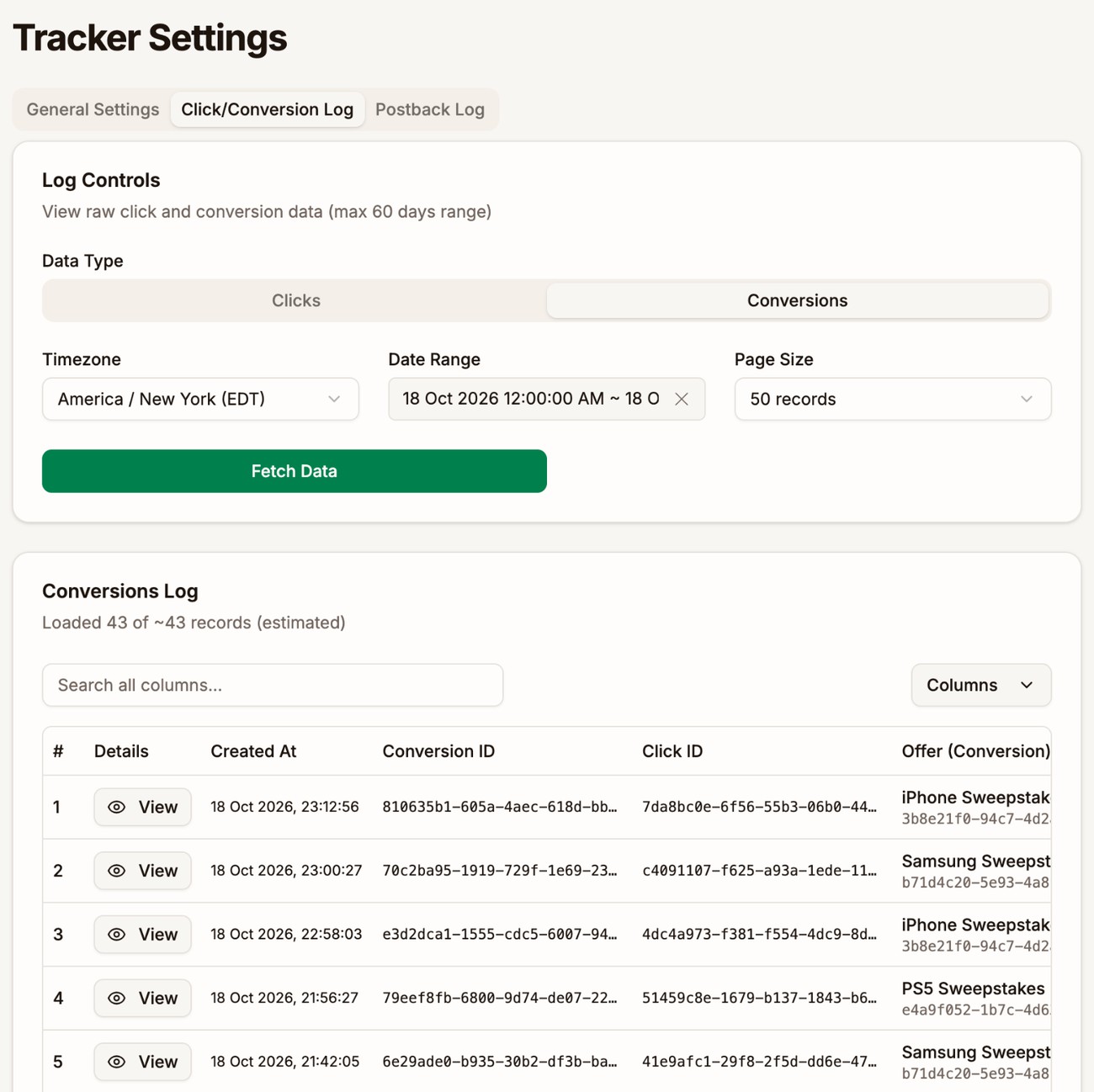
If the postback is not recorded, your browser shows why:
| Message | What it means |
|---|---|
Click ID is required | The URL has no clickid. |
Invalid click ID | The click ID is not one of your clicks. Check that your offer source sends back the value it received in the Offer URL. |
Transaction ID already processed for this click | A conversion with this tid was already recorded for this click. |
Conversion already processed for this click | This click already has a conversion of this kind, and the postback has no tid. |
Invalid postback endpoint | The part after /u/ is wrong. Copy the postback URL again. |
Forward conversions with piggyback postbacks
A piggyback postback sends each conversion on to another URL, such as another tracker or a partner who needs to know about your sales. Add one in the Piggyback Postbacks card on the General Settings tab of Tracker Settings. Click Add Postback.
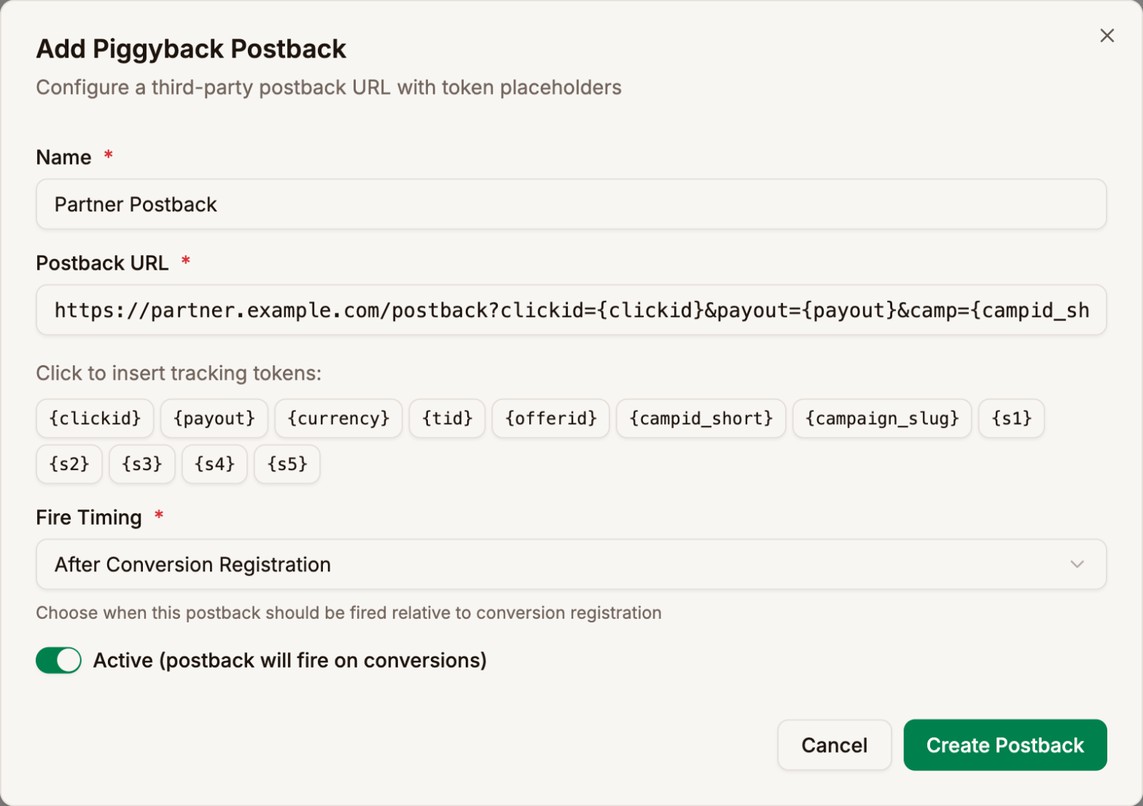
| Field | What it does |
|---|---|
| Name | How the postback appears in your list. |
| Postback URL | The URL to call. Click a token button to add a value from the conversion. |
| Fire Timing | After Conversion Registration calls the URL only when Proferex records the conversion. Before Conversion Registration calls it for every postback your offer sources send, even ones Proferex does not record, such as duplicates. |
| Active | Turn it off to stop the postback without deleting it. |
The tokens you can use are {clickid}, {payout}, {currency}, {tid}, {offerid}, {s1} to {s5}, and the campaign's {campid_short} and {campaign_slug}. They carry the values from the incoming postback, with the offer's payout and currency filled in if the postback had none.
Piggyback postbacks fire for every conversion that arrives at your postback URL, from any offer source. Each one is tried once and not retried automatically.
To send conversions back to the traffic source the visitor came from, use the traffic source's own Postback URL instead. See Postback URL.
Check the Postback Log
The Postback Log tab of Tracker Settings lists every postback Proferex sends out: to your traffic sources and to your piggyback URLs. Each row shows the URL that was called, its status, and the response code. Click Retry on a row to send it again.
Conversions your offer sources send to you appear in the Conversions log, not the Postback Log.
Next step
Add your postback URL to each offer source you work with, then send one test conversion before you start paying for traffic.